Talvoryx
Anchor Deck
Anchor Deck
Couldn't load pickup availability
-
Problem Statement
After learners understand variables, conditions, loops, and methods, C# can still feel difficult when classes and objects appear. A class may look like a container, a plan, a code section, or a new type all at once, which can make the topic feel unclear. Learners may also confuse fields, properties, constructor parameters, and object values because they all seem connected but serve different purposes. Without a careful explanation, object-based code may look larger than the ideas behind it actually are. Anchor Deck was created to give this part of C# a slower and more structured study path. -
Solution
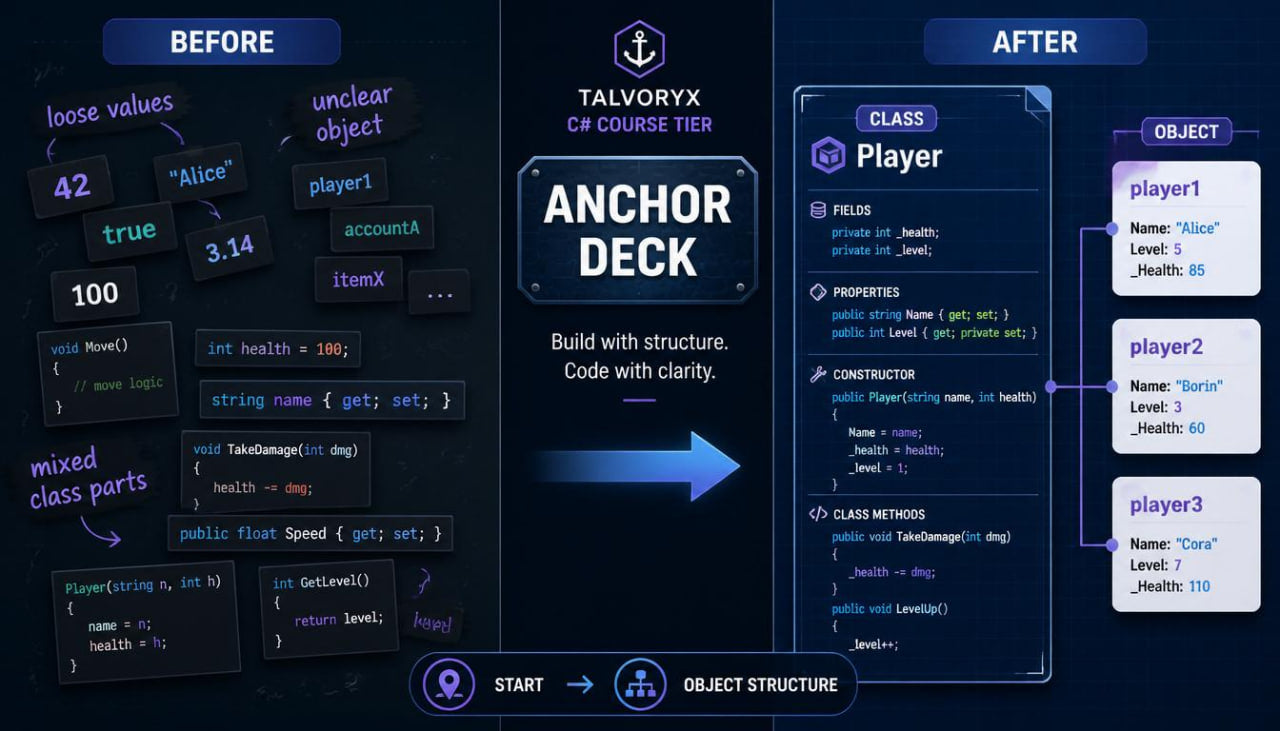
Anchor Deck explains classes and objects through plain written modules, small examples, review notes, and practice tasks. The course starts by showing why related data and actions can be grouped together, then introduces class structure step by step. Learners study how objects are created, how values are placed inside them, and how methods can belong to a class. The material uses compact examples so learners can focus on the role of each part instead of being distracted by large code files. By the end of the course, learners can read simple object-based C# examples with a clearer sense of how the parts connect. -
What’s Inside
Anchor Deck begins with an orientation section that explains how the course should be read. It introduces the main study pattern: read a concept, examine a small example, trace the values, complete a task, and return to the recap page when needed. This opening section also explains that the course focuses on code structure rather than broad project building.
The first main module introduces the idea of grouping information. Before showing class syntax in detail, the course explains why related details can be easier to discuss when they are placed together. For example, a learner may see separate values for a name, level, score, or item count. The material then shows how a class can describe a shape for related values. The goal is to make the reason for classes visible before introducing heavier syntax.
The next module explains the basic shape of a class. Learners study the class keyword, the class name, the body of the class, and the members placed inside it. The course explains that a class can describe what kind of information an object may hold and what actions may belong near that information. Short examples show simple class layouts without unnecessary details. Learners are asked to identify the class name, the member names, and the purpose of each section.
A full module is dedicated to objects. This part explains how an object is created from a class and how each object can hold its own values. Learners compare the class as a description with the object as a created instance. The material avoids abstract language where possible and instead uses small readable examples. Learners trace two objects created from the same class and observe how their values can differ.
The course then introduces fields. This section explains that fields can store information inside a class. Learners see how field names and data types work together and how fields belong to an object. The examples stay simple: text values, numbers, and true-or-false values. Practice tasks ask learners to identify fields, choose clearer field names, and describe what each value represents.
A separate module covers properties. This section explains how properties can provide a cleaner way to work with values stored in an object. Learners compare fields and properties through short examples and study the common get and set structure. The material explains why properties are often seen in C# class examples and how they can make object values easier to read and update in a controlled way. Tasks ask learners to match property names with the type of information they describe.
Anchor Deck also includes a constructor module. This section explains how constructors help set starting values when an object is created. Learners study constructor names, parameter lists, assignment lines, and object creation examples. The course shows how values passed into a constructor can become values stored inside the object. Practice prompts ask learners to trace constructor arguments, identify which property receives which value, and complete missing assignment lines.
The next section connects methods with classes. Learners already studied methods in an earlier tier, so Anchor Deck now shows how methods can belong inside a class. The course explains how a method can use the object’s own values and return a result or perform a small action. Examples may include simple calculations, text descriptions, checks, or updates. The focus is on reading how object data and object behavior sit near each other.
A practical reading module combines fields, properties, constructors, and methods. Learners study small class examples from top to bottom. They identify the class name, the stored values, the constructor, and any methods placed inside the class. Then they read object creation lines and trace how values move from the call into the object. These guided reading tasks are central to the course because they help learners see classes as structured sections rather than visual clutter.
The course includes a comparison section that shows common beginner mix-ups. It compares class and object, field and property, parameter and stored value, constructor and method, object creation and method call. Each comparison is explained with short notes and examples. This section is useful for review because these pairs often look similar when learners are new to object-based code.
Anchor Deck also includes task pages after the main modules. These tasks ask learners to name a class, create a small property list, complete a constructor, trace object values, identify where a method belongs, and explain an object example in plain language. The tasks are written to support careful study rather than pressure-based achievement claims.
The recap section gathers the course ideas into organized review notes. Learners can revisit class layout, object creation, fields, properties, constructors, and class methods in one place. The recap is arranged as short blocks so a learner can review one concept without rereading the whole course.
The glossary explains key terms used throughout Anchor Deck. Terms include class, object, instance, field, property, constructor, parameter, assignment, member, method, object value, get, set, and class body. Each definition connects back to the course examples, helping learners build vocabulary through context.
-
Who Is This For?
Anchor Deck is for learners who already understand basic C# methods and want to study classes and objects in a careful way. It is suitable for someone who can read short code blocks but feels uncertain when several members appear inside one class.
This course is also useful for learners who want to prepare for wider C# topics involving collections, object lists, data models, and layered code examples. Since many later C# materials use classes often, this tier gives learners time to understand the structure before moving further.
Anchor Deck may also suit learners who prefer written study pages with diagrams in words, short examples, and review tasks. It does not rely on inflated claims, pressure language, or dramatic sales wording. The focus stays on organized C# learning materials and steady topic development.
- What You’ll Learn
- How a C# class is arranged
- How objects are created from a class
- How fields store object information
- How properties describe values inside an object
- How get and set appear in common property examples
- How constructors place starting values into an object
- How constructor parameters connect to stored values
- How methods can belong inside a class
- How object values and object methods work together
- How to compare class, object, field, property, constructor, and method
- How to trace object creation line by line
- How to read simple object-based C# examples
- How to complete short class and object study tasks
- How to use glossary notes for class-related vocabulary
-
Refund Note
For paid Talvoryx tiers, the store may provide a 30-day refund window according to the policy shown during checkout and on the store policy pages. Please review the refund terms before placing an order, because handling may depend on order details, delivery status, and the selected digital course materials.
Self-paced learning overview
- 💾 Digital file available after purchase
- 🗂️ Long-term availability
- 🔐 Secure checkout
- 🗓️ Content updated in 2026
What format are Talvoryx courses provided in?
What format are Talvoryx courses provided in?
Talvoryx courses are written digital study materials arranged into modules, examples, short tasks, notes, and review pages. The format is made for reading, checking examples, and returning to earlier sections when needed.
Do I need prior C# experience?
Do I need prior C# experience?
No prior C# study is required for the starting tiers. Wider tiers add broader topic coverage, but each Talvoryx course keeps the structure organized and suitable for steady learning.
How should I study the materials?
How should I study the materials?
You can move through the course page by page, pause after each example, complete the tasks, and use the recap notes for review. The materials are designed to support a calm study rhythm without pressure-based claims.
Share