Talvoryx
Motion Sphere
Motion Sphere
Couldn't load pickup availability
-
Problem Statement
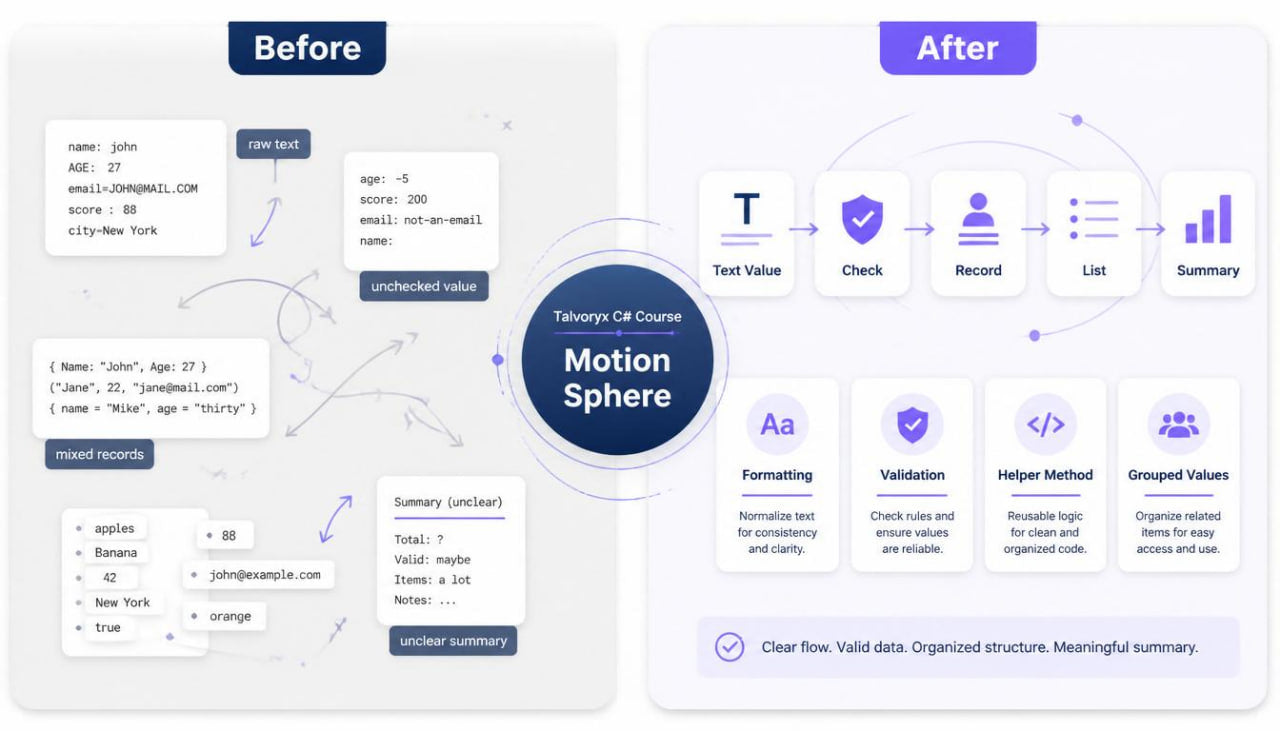
After studying variables, methods, classes, collections, and issue review, many learners begin to wonder how C# examples can work with information beyond a single line of code. Text may need to be cleaned, values may need to be checked, and grouped information may need to be arranged before it is used. Learners can feel uncertain when examples include several steps, such as receiving a value, checking it, changing it, storing it, and showing a result. It may also be difficult to understand where information comes from and how it moves through a method, object, or collection. Motion Sphere was created to help learners study the movement of information through C# examples in a structured and practical way. -
Solution
Motion Sphere presents C# data flow topics through written modules, compact examples, review notes, and guided tasks. The course begins with simple text values, then moves into formatting, parsing-style thinking, validation, grouping, and file-related reading ideas. Each section shows how information can be received, checked, shaped, and used inside a small code example. The material connects earlier Talvoryx topics such as methods, classes, lists, loops, and exception handling. Instead of using oversized examples, Motion Sphere keeps the focus on readable information movement and careful study habits. -
What’s Inside
Motion Sphere begins with an orientation section that explains how to use the course materials. Learners are introduced to the main study rhythm: follow the value, identify each change, review the result, and write a short explanation of what happened. This section also explains that the course focuses on information flow rather than large application building. The learner is encouraged to trace values slowly and notice how each line affects the next one.
The first main module introduces text handling in C#. Learners study text values, string variables, and simple operations that appear often in beginner examples. The course explains how text can be stored, combined, compared, trimmed, or checked. Examples may include names, labels, short messages, category values, or simple records. The focus is on reading what happens to a text value as it moves through several lines.
The next module explores text formatting. This section explains how values can be arranged into readable output-style strings. Learners study examples where numbers, names, and status values are placed into a text pattern. The course shows how formatted strings can help describe stored information in a clearer way. Practice prompts ask learners to identify which values are inserted into a formatted line and how the final text is shaped.
A separate section introduces parsing-style thinking. This module explains that information may arrive in text form but need to be treated as a number, true-or-false value, or another type. Learners study small examples where a text value is checked and then converted into a usable value. The section connects with earlier type-related study from Slate Node, helping learners understand why type matching matters. The material avoids heavy theory and focuses on the reading pattern: receive text, check the shape, convert when suitable, and use the result.
Motion Sphere also includes a module on validation paths. Learners study how values can be reviewed before being stored or used. Examples include checking whether text is empty, whether a number sits inside a chosen range, whether a list has items, and whether a value matches a simple rule. This section explains that validation is part of information movement because it affects which path the code follows. Tasks ask learners to mark which values continue, which values are rejected by a condition, and which values need another check.
The next section focuses on simple data records. Learners study how several related values can describe one item. The course connects this idea with earlier class and object topics from Anchor Deck. A small class may hold a title, count, date-like label, or status value. The course shows how text values can be turned into object values and how object values can later be arranged for display or review. This helps learners connect data flow with object structure.
A list-based module follows. This part explains how multiple records can be stored in a list and reviewed one by one. Learners study examples where items are added to a list, checked in a loop, filtered by a condition, or arranged into a simple summary. The course connects this with collection concepts from Cipher Pattern. The focus is not on large data systems; it is on reading how each item moves through the loop and how the list changes over time.
Motion Sphere also includes an introductory file-reading concept section. This part explains, in a beginner-friendly way, how C# examples may read lines of information from a stored file-like source. The course avoids naming third-party programs and keeps the topic general. Learners study the idea that each line can be read, split into smaller parts, checked, and placed into a structured object. The examples are written as study materials rather than full setup instructions. The aim is to understand the flow of information from stored text into organized values.
A related section covers line-by-line processing. Learners examine examples where each line follows the same pattern. The course shows how a loop can read one line, check whether it has the expected parts, create values from those parts, and store a result. The learner is guided to notice repeated steps and understand why methods can help organize them. This section combines loops, methods, validation, collections, and objects in a modest way.
The next module focuses on helper methods for information flow. Learners study methods that clean a value, check a rule, create an object, or format a result. Each method has a small purpose. The course explains how dividing the work into named sections can make the information path easier to describe. Practice tasks ask learners to match a helper method with its role in the data flow.
Motion Sphere also includes a section on result summaries. Learners study examples where a list is reviewed and a short summary is created. This may include counting items, identifying matching values, building a text report, or grouping simple labels. The material shows how earlier collection and condition ideas can help shape information into a readable result. Learners are asked to trace which items are included and which conditions affect the summary.
A practical tracing module brings the course together. Learners are given short C# examples with several connected steps. A value may begin as text, pass through validation, change into another type, become part of an object, enter a list, and appear in a final formatted line. The learner follows each stage and writes a short explanation of the journey. These guided tasks are central to the course because they connect many earlier Talvoryx topics into one readable pattern.
The course includes review pages after each major module. These pages summarize text handling, formatting, type conversion ideas, validation, records, lists, line processing, helper methods, and summaries. Each recap section is arranged into small blocks, making it easier to return to one topic during review.
The glossary explains key terms used throughout Motion Sphere. Terms include text value, formatting, parsing, validation path, record, line processing, helper method, data flow, conversion, summary, stored value, checked value, formatted result, and structured item. Each definition is connected to the course examples so the vocabulary remains grounded in practical reading.
-
Who Is This For?
Motion Sphere is for learners who already understand core C# structure and want to study how information moves through connected examples. It is suitable for learners who can read variables, methods, classes, lists, and conditions, but want more practice following values across several steps.
This course may also suit learners who want to understand text handling and simple data organization. It does not focus on broad setup or outside services. Instead, it gives attention to C# reading patterns that appear when values are received, checked, changed, stored, and summarized.
Motion Sphere is a good fit for learners who enjoy written study materials with practical tasks. It supports learners who want to trace data flow carefully and connect earlier topics in a more complete way. The course avoids pressure-based claims and keeps the focus on structured C# study.
- What You’ll Learn
- How text values move through C# examples
- How to read basic text handling patterns
- How formatted strings arrange values into readable lines
- How parsing-style thinking connects text with other data types
- How validation affects the path a value follows
- How related values can form a simple record
- How objects can store structured information
- How lists can hold several records
- How loops process grouped information line by line
- How helper methods can organize small data-flow tasks
- How to create simple summaries from grouped values
- How to trace information from input-style text to a formatted result
- How to connect methods, objects, lists, and conditions in one example
- How to use recap notes and glossary pages for review
-
Refund Note
For paid Talvoryx tiers, the store may provide a 30-day refund window according to the policy shown during checkout and on the store policy pages. Please review the refund terms before placing an order, because handling may depend on order details, delivery status, and the selected digital course materials.
Self-paced learning overview
- 💾 Digital file available after purchase
- 🗂️ Long-term availability
- 🔐 Secure checkout
- 🗓️ Content updated in 2026
What format are Talvoryx courses provided in?
What format are Talvoryx courses provided in?
Talvoryx courses are written digital study materials arranged into modules, examples, short tasks, notes, and review pages. The format is made for reading, checking examples, and returning to earlier sections when needed.
Do I need prior C# experience?
Do I need prior C# experience?
No prior C# study is required for the starting tiers. Wider tiers add broader topic coverage, but each Talvoryx course keeps the structure organized and suitable for steady learning.
How should I study the materials?
How should I study the materials?
You can move through the course page by page, pause after each example, complete the tasks, and use the recap notes for review. The materials are designed to support a calm study rhythm without pressure-based claims.
Share